Wix vs WordPress: ownership, cost, flexibility and lock-in
Wix and WordPress both put a website online without writing code, so they get compared as if they were two brands of the same product. They are not. Wix is a service you rent: the editor, the hosting and the software come as one package that runs on Wix's servers. WordPress is software you install, or have a host install for you, and then run where you like. Almost every practical difference between them follows from that.
This guide compares the two on the four questions that matter over the life of a site: who owns it, what it really costs, how far you can bend it, and what happens the day you want to leave.
First, which WordPress?
The name covers two different things. WordPress.org distributes the free, open-source software; you need a web host to run it, and you are the administrator of everything. WordPress.com is a hosted service built on that software by the company Automattic, closer to Wix in spirit, with plans that unlock plugins and custom themes at the higher tiers. In this guide, "WordPress" means the self-hosted software unless stated otherwise.
How big each one is
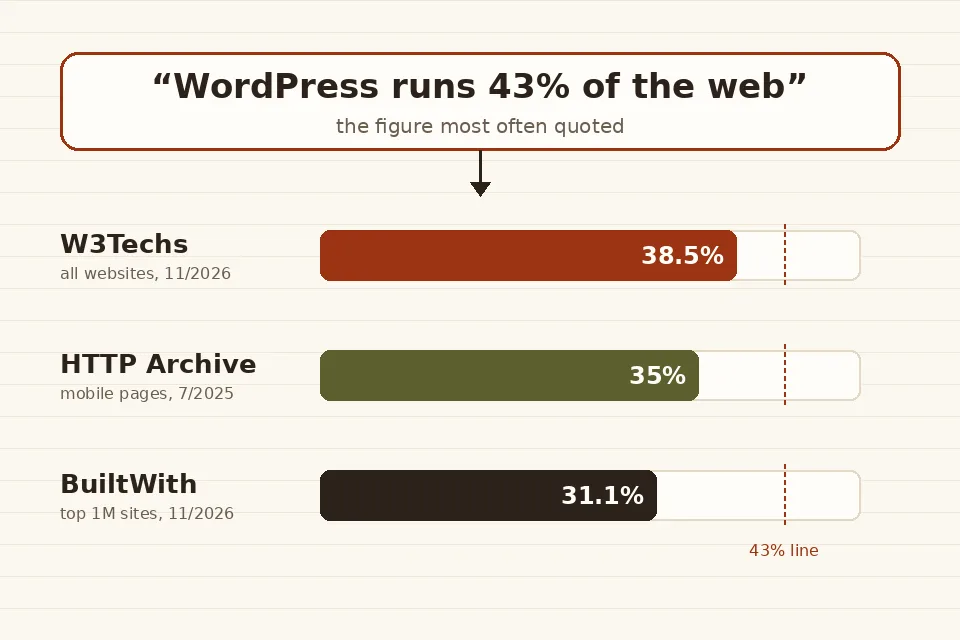
Popularity is not a reason to choose a platform, but it tells you how large the pool of themes, plugins, developers and answered forum questions will be. On 28 November 2026, the survey of W3Techs found WordPress on 38.3% of all websites, a 57.3% share of the sites whose content management system it can identify. Wix was on 4.1% of all websites, a 6.2% share, behind Shopify. We looked at how such figures are measured, and why they differ between surveys, in our analysis of how much of the web really runs on WordPress.
In practice, a WordPress site can be handed to almost any web agency or freelancer in the world. A Wix site can be edited by anyone who learns the Wix editor, which is easy, but the professional market around it is smaller.
Ownership: renting or running
This is the question people skip and regret. Wix's own help centre is explicit: in its article on exporting a Wix site, it explains that the site is built with Wix technology and, to work properly, must be hosted and operated on Wix's servers. You can connect a domain bought elsewhere, but you cannot download the site and run it somewhere else.
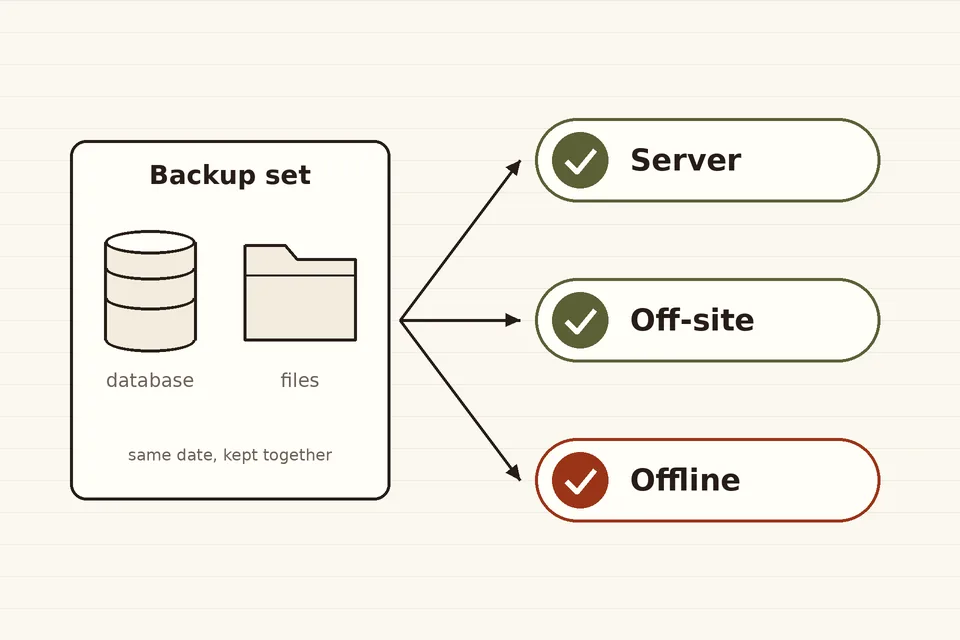
WordPress is distributed under the GNU General Public License, which gives you the right to run, study, change and redistribute the software. Your site is a folder of files and a database. You can copy both, move them to another host, or keep them on a disk in a drawer. That freedom has a cost, which is responsibility: nobody but you, or the person you pay, will apply the updates or restore the site if something breaks.
Your words and pictures belong to you on both platforms. The difference is in the container: on Wix you own the content inside a site you rent; on WordPress you own the content and the copy of the software that displays it.
Cost: the sticker price and the three-year price
Wix has a free plan, which shows Wix branding and uses a Wix address. To use your own domain and remove the branding you need a premium plan; the main tiers are currently called Light, Core and Business, with prices that vary by country and are billed monthly or yearly. The price covers hosting, security updates, the editor and support. What it does not cover are paid apps from the Wix App Market, which many sites end up adding for bookings, forms or extra features.
WordPress itself is free. The bill is made of other things:
- a domain name, renewed every year;
- hosting, from cheap shared plans to managed WordPress hosting that includes updates and backups;
- a theme, free or paid, and paid plugins if the free ones are not enough;
- time, or the fee of someone who keeps the site updated.
A useful exercise before choosing is to price both over three years rather than one month, with every add-on you know you will need. Introductory discounts, on hosting as on builders, tend to vanish at the first renewal. For a five-page brochure site, the totals are often close. For a site that needs a booking system, a membership area or a shop, the add-ons decide it.
Flexibility: what you can change
Wix is a closed system that is easy to work in. You move blocks on a canvas, pick from a large library of templates and add features from the App Market. For custom behaviour, Wix offers a developer platform, but your code still runs inside Wix and within its rules. You cannot install arbitrary server software, choose your caching, or edit the HTML the platform produces.
WordPress is open in every direction. You can edit or replace the theme, add one of tens of thousands of plugins, write your own, and change the server configuration if your host allows it. The block editor and block themes have made design changes possible without code, but the learning curve is steeper than Wix's, and the openness is also the main source of trouble: a badly maintained plugin is the most common way into a WordPress site. Keeping core, themes and plugins up to date, which we cover in our guide to WordPress updates, is not optional.
Lock-in: the day you want to leave
Sites outlive the tools they were built with. The day you want to change platform, the two behave very differently.
Leaving WordPress is a technical job, not a negotiation. The software has a built-in export tool that saves posts, pages, comments, categories, tags, custom fields and users to an XML file another WordPress site can import, and a full backup of files and database lets you rebuild the site elsewhere exactly as it was. Our backup guide explains how to make that copy and test it.
Leaving Wix means rebuilding. Since the site cannot be exported to run elsewhere, the usual route is to recreate the design on the new platform, move the text and images across, and redirect each old address to its new equivalent so that search engines and visitors follow. That last step matters more than any other: a move without redirects throws away years of links and search rankings. The principles are the same as when you change permalinks in WordPress: one old address, one new address, a permanent 301 redirect between them.
The domain name is the one asset to keep under your own control from day one. Register it with a registrar you choose and point it at the platform, rather than buying it bundled with the site builder: it makes any future move simpler.
So which one?
Wix suits people who want a good-looking site quickly, are happy to pay a subscription for not having to think about hosting and updates, and do not expect to outgrow the platform's features. A restaurant, a photographer or a local tradesperson with a handful of pages is often well served.
WordPress suits sites that will grow, publish a lot, need features no builder offers, or must stay portable: a magazine, a membership organisation, a shop that may change provider, a site an agency will maintain for years. It asks for more care, or for a budget to pay for that care.
Whatever you choose, three habits protect you: own your domain, keep your own copy of your content, and write down the address of every page so that a future move can redirect them one by one.
Sources
- W3Techs, "Usage statistics of content management systems", figures for 28 November 2026.
- Wix Help Center, "Exporting or Embedding Your Wix Site Elsewhere", and Wix, premium plans page, consulted 28 November 2026.
- WordPress.org Documentation, "Tools Export Screen"; WordPress.org, "License" (GNU General Public License), consulted 28 November 2026.
 Plugin history
Does WordPress run 43% of the web?
The famous 43% was a W3Techs figure. In November 2026 W3Techs says 38.5%, HTTP Archive about 35% and BuiltWith 31% of its top million.
 Logins & security
Backing up WordPress
Files and database as one set, copies in separate places, and a test restore before the day you need it.
 WordPress how-tos
Changing URLs safely
What WordPress redirects by itself, what it does not, and how to rename pages or change the permalink structure without 404s.